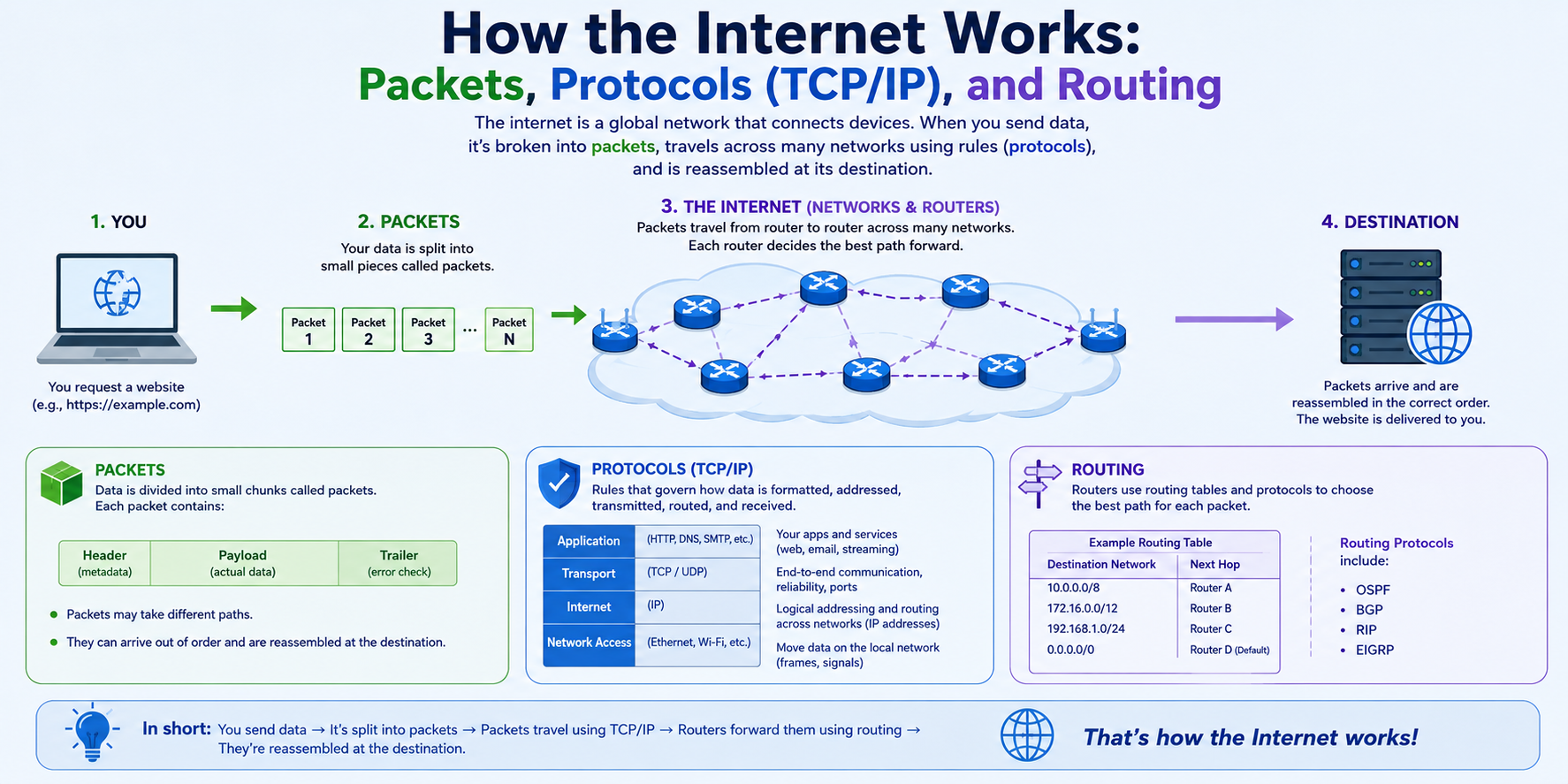
How the Internet Works: Packets, Protocols (TCP/IP), and Routing.
Think of the internet not as a single continuous stream of water through a pipe, but as a global, ultra-fast postal service. When you load a website, stream a video, or send a message, that file isn’t transmitted in one giant block. Instead, it gets chopped up into millions of tiny digital postcards called packets, routed across dynamic paths around the world, and reassembled in milliseconds at the destination.
Here is how the core engine of the web works across its three main pillars: Packets, Protocols (TCP/IP), and Routing.
1. Packets: The Envelopes of Data
A packet is a small chunk of data (typically less than 1,500 bytes) sliced from a larger file.
Why split data into packets?
-
Shared Capacity: If files were sent as giant uninterrupted streams, a single user downloading a large file would freeze the entire network line for everyone else.
-
Resilience: If a tiny packet drops due to signal interference, only that specific slice needs to be resent—not the whole file.
Inside a Packet
Every packet is wrapped into three distinct sections:
| Section | Role | Key Contents |
| Header | Delivery instructions | Source IP, Destination IP, Sequence number, Protocol type |
| Payload | The actual content | A slice of image, text, or audio data |
| Trailer | Error checking | Checksum bits to verify the payload wasn’t corrupted in transit |
2. Protocols: The Rules of the Road (TCP/IP)
For billions of different smartphones, servers, and smart devices to understand each other, they must follow a unified set of rules called protocols. The foundational framework of the internet is the TCP/IP protocol suite.
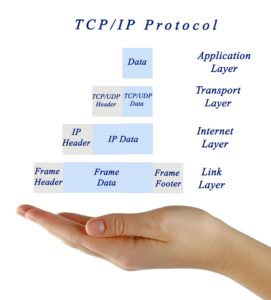
Data moves through these layers via encapsulation—each layer wraps the data with its own header before passing it down the line:
IP (Internet Protocol) — The Addressing System
IP handles the logic of getting data to its destination address. Every connected device receives a unique IP address (such as 192.0.2.1 in IPv4 or 2001:db8::1 in IPv6).
-
IP works like a mail carrier: it labels the source and destination addresses on every packet header.
-
IP is connectionless and best-effort—it ships packets out, but doesn’t track whether they successfully arrive.
TCP (Transmission Control Protocol) — The Delivery Manager
TCP sits on top of IP to guarantee absolute reliability. It acts like registered mail with tracking and delivery verification:
-
Connection Setup: Establishes a reliable connection via a “3-Way Handshake” (Sender sends
SYN$\rightarrow$ Receiver returnsSYN-ACK$\rightarrow$ Sender confirmsACK). -
Sequencing: Numbers every packet (
#1,#2,#3) so the receiving device can reconstruct the file in exact order, even if packets arrive out of sequence. -
Loss Recovery: If Packet
#4drops along the way, the receiver’s TCP manager requests a retransmission for that specific packet.
What about UDP? For real-time applications like video calls or online gaming where speed matters more than perfection, the User Datagram Protocol (UDP) is used instead of TCP. It skips error recovery and packet sequencing to achieve near-zero latency.
3. Routing: Navigating the Global Web
Once a packet is assembled by TCP and addressed by IP, it needs to travel through physical infrastructure—fiber-optic undersea cables, cell towers, and high-speed switches. Navigation is managed by routers.
-
Routers: Specialized network devices stationed at network junctions. They continuously inspect incoming packet headers.
-
Routing Tables & BGP: Routers consult dynamic lookup tables using protocols like Border Gateway Protocol (BGP) to calculate the optimal path based on current network congestion, hardware health, and hop counts.
-
Dynamic Pathing: Two packets belonging to the same single image might travel entirely different physical routes (e.g., Packet A via Chicago, Packet B via Atlanta) to avoid a congested fiber trunk, reuniting at the destination micro-seconds apart.
Putting It Together: A Packet’s Journey
Here is step-by-step how a webpage request travels from your device to a remote server and back: